
Abstract
Quality of Service (QoS) is the collection of networking technologies, policies, algorithms, and operational practices used to manage how network traffic competes for limited resources. As networks have evolved from simple data-transfer systems into highly distributed infrastructures carrying voice, video, cloud applications, artificial intelligence workloads, industrial systems, financial transactions, IoT traffic, and mission-critical services, controlling traffic has become increasingly important.
A network may have sufficient total bandwidth and still deliver poor application performance because packets experience congestion, delay, jitter, packet loss, or unfair resource allocation. QoS addresses this problem by identifying traffic, classifying it according to requirements, assigning priorities, controlling transmission rates, managing queues, scheduling packets, and monitoring performance.
This thesis explains QoS from fundamental networking concepts through advanced traffic-management architectures. It covers bandwidth, latency, jitter, packet loss, congestion, classification, marking, policing, shaping, queuing, scheduling, congestion avoidance, admission control, DiffServ, IntServ, MPLS, SD-WAN, Wi-Fi QoS, cloud networking, data centres, 5G, and practical configuration concepts. It also provides a step-by-step tutorial for designing a QoS policy.
1. Introduction: Why Network Traffic Needs Management
A computer network is fundamentally a shared-resource system.
Many devices may simultaneously compete for:
- Internet bandwidth
- Router interfaces
- Switch links
- Wireless spectrum
- CPU resources
- Memory
- Network buffers
- WAN circuits
- Data-centre links
- Cloud connectivity
- Cellular radio resources
Consider a 100 Mbps Internet connection serving a business.
At one moment the network may carry:
- Voice calls
- Microsoft Teams or Zoom meetings
- Web browsing
- Cloud applications
- Software updates
- CCTV traffic
- File transfers
- Database replication
- Backups
- Streaming video
If all traffic is treated identically, a large backup or software download can consume most available capacity.
The result may be:
Backup traffic → congestion → queues grow → packets wait → latency increases → voice packets arrive late → calls become distorted.
QoS attempts to prevent this situation by giving different traffic different treatment according to business and technical requirements.
2. What Does QoS Actually Mean?
QoS stands for Quality of Service.
In networking, QoS refers to mechanisms that control and influence the treatment of packets as they move through a network.
QoS does not magically create additional bandwidth.
Instead, it determines:
Who gets network resources, when they get them, how much they can use, and what happens when the network becomes congested.
A simplified model is:
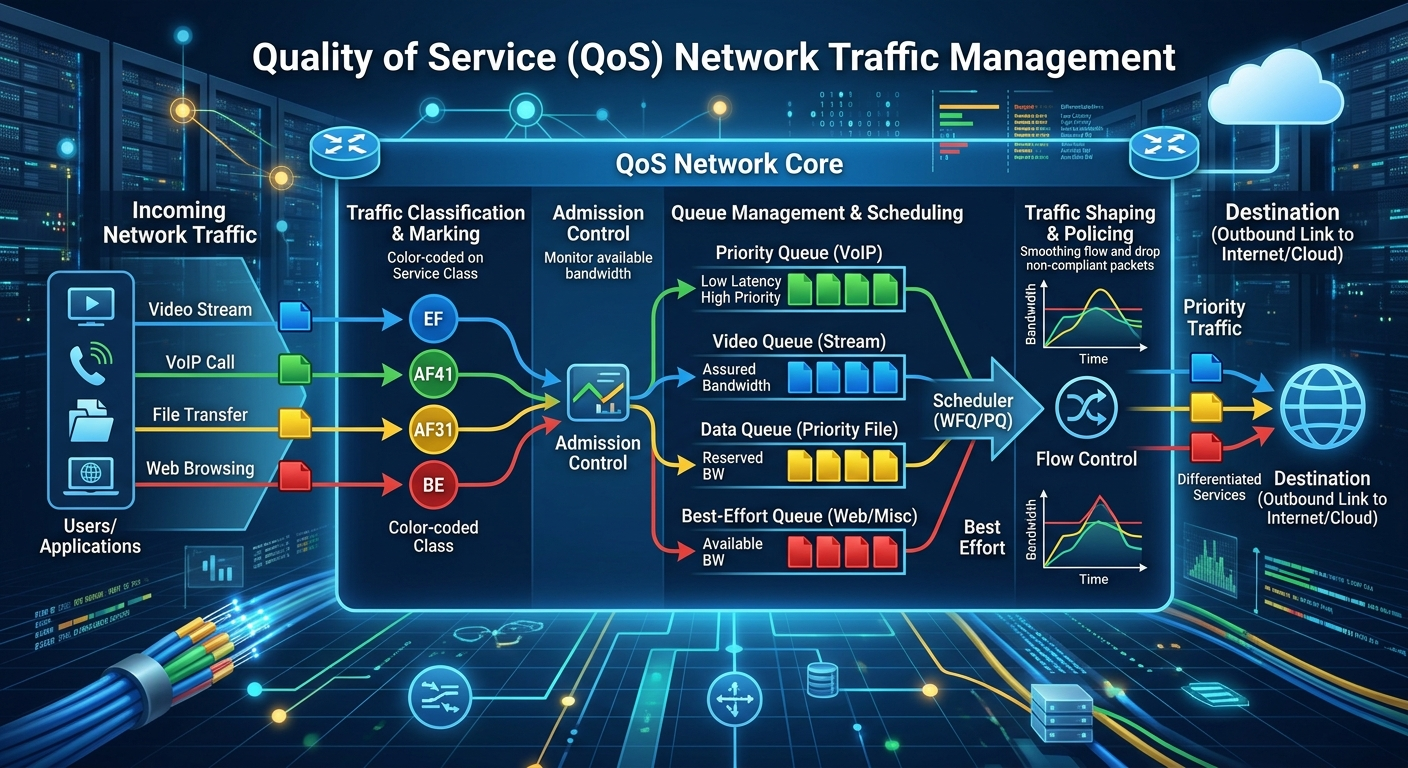
Applications → Packets → Classification → Marking → Queue → Scheduling → Transmission
QoS therefore operates as a traffic-management system.
3. The Four Fundamental QoS Measurements
Four measurements are particularly important.
3.1 Bandwidth
Bandwidth is the maximum rate at which data can theoretically be transmitted.
Examples:
- 10 Mbps
- 100 Mbps
- 1 Gbps
- 10 Gbps
- 100 Gbps
- 400 Gbps
Bandwidth is commonly expressed in bits per second.
A 1 Gbps link theoretically provides:
1,000,000,000 bits/second
Actual application throughput can be lower because of protocol overhead, congestion, hardware limitations, and other factors.
4. Latency
Latency is the time required for data to travel from one point to another.
It can be divided into several components:
Total latency = propagation + transmission + processing + queuing
Propagation delay
The physical time required for a signal to travel through the medium.
Transmission delay
The time required to place the packet onto the link.
Processing delay
The time required for network equipment to examine and process the packet.
Queuing delay
The time a packet waits in a buffer before transmission.
QoS is particularly concerned with queuing delay, because congestion can dramatically increase it.
5. Jitter
Jitter is variation in packet delay.
Suppose packets arrive at:
- 10 ms
- 11 ms
- 10 ms
- 45 ms
- 12 ms
The average delay may appear acceptable, but the variation can damage real-time applications.
Voice and interactive video are especially sensitive to jitter.
A simplified conceptual model is:
Jitter = variation in packet arrival timing
6. Packet Loss
Packet loss occurs when packets fail to reach their destination.
Packets may be lost because of:
- Congestion
- Full buffers
- Transmission errors
- Hardware failure
- Wireless interference
- Routing problems
- Network policy
- Security filtering
Some applications can tolerate packet loss better than others.
A file-transfer protocol can normally retransmit missing information.
Real-time voice cannot simply replay a missing packet at the exact moment it was supposed to arrive.
7. The QoS Problem: Network Congestion
Congestion occurs when the amount of traffic requiring transmission exceeds available network capacity.
Imagine a road with:
10,000 vehicles/hour capacity
but:
15,000 vehicles/hour demand
The road cannot process all traffic immediately.
A queue develops.
Networking works similarly.
Traffic demand > available capacity → queue formation → delay → packet loss
QoS provides mechanisms for managing this competition.
8. The Basic QoS Architecture
A useful conceptual architecture is:
                    APPLICATIONS
                         |
        +----------------+----------------+
        |                |                |
       Voice           Video             Data
        |                |                |
        +----------------+----------------+
                         |
                   CLASSIFICATION
                         |
                      MARKING
                         |
                  POLICY DECISION
                         |
             +-----------+-----------+
             |                       |
          POLICING                SHAPING
             |                       |
             +-----------+-----------+
                         |
                    QUEUE SYSTEM
                         |
                    SCHEDULING
                         |
                     NETWORK
                         |
                    DESTINATION
Each stage performs a different function.
9. Step 1 — Traffic Classification
Classification answers:
What type of traffic is this?
A router or switch may identify traffic using:
- Source IP address
- Destination IP address
- Source port
- Destination port
- Protocol
- DSCP value
- VLAN
- Application identity
- Interface
- User identity
- Device identity
- Network segment
For example:
VoIP → Voice class
Video conference → Interactive video class
Business application → Business-critical class
Web → Standard class
Backup → Bulk-data class
Unknown → Default class
Classification is the foundation of QoS.
If traffic cannot be correctly identified, the network cannot reliably provide differentiated treatment.
10. Step 2 — Traffic Marking
After classification, traffic may be marked.
One important IP-based marking mechanism is DSCP — Differentiated Services Code Point.
DSCP uses the IP header to communicate the desired forwarding treatment of packets.
Conceptually:
Packet
  |
  +-- DSCP marking
          |
          +-- Network devices examine marking
                    |
                    +-- Appropriate queue
                    |
                    +-- Appropriate scheduling
Marking allows QoS information to travel across multiple network devices.
11. DSCP and Traffic Classes
Different organisations may establish different QoS policies, but a common conceptual classification might be:
| Traffic | Example treatment |
|---|---|
| Network control | Very high priority |
| Real-time voice | Low delay/high priority |
| Interactive video | High priority |
| Critical business applications | Guaranteed allocation |
| Standard applications | Normal treatment |
| Bulk transfers | Lower priority |
| Unknown traffic | Default treatment |
The exact DSCP values and policy depend on the network architecture and standards being used.
12. Step 3 — Queuing
When packets arrive faster than a network interface can transmit them, packets wait in queues.
A simplified queue looks like:
Incoming packets
       |
       v
+------------------+
| Packet Queue     |
| P1               |
| P2               |
| P3               |
| P4               |
+------------------+
       |
       v
Transmission link
The important question becomes:
Which packet should leave the queue next?
That is the job of packet scheduling.
13. First-In, First-Out (FIFO)
FIFO is the simplest method.
The first packet arriving is the first packet transmitted.
Arrival:

P1 → P2 → P3 → P4

Transmission:

P1 → P2 → P3 → P4
FIFO does not differentiate between applications.
A voice packet and a large file-transfer packet can therefore receive essentially the same treatment.
14. Priority Queuing
Priority queuing creates different levels of importance.
For example:
Priority 1: Voice
Priority 2: Video
Priority 3: Business
Priority 4: General
Priority 5: Bulk
The scheduler serves higher-priority traffic first.
The advantage is low latency for critical traffic.
The danger is starvation.
If high-priority traffic continuously consumes resources, lower-priority traffic may receive insufficient service.
Therefore practical QoS systems normally impose limits or use more sophisticated scheduling.
15. Weighted Fair Queuing
Weighted scheduling attempts to distribute bandwidth according to configured weights.
Example:
Voice       30%
Video       25%
Business    25%
General     15%
Bulk         5%
These percentages are conceptual rather than universal.
The objective is to prevent one traffic class from completely dominating the link.
16. Class-Based Queuing
Class-based QoS creates logical traffic classes.
Example:
Class 1 — Voice
Class 2 — Video
Class 3 — Critical business
Class 4 — Standard
Class 5 — Bulk
Each class receives a scheduling policy.
This is particularly useful in enterprise networks because it allows administrators to express business priorities.
17. Low-Latency Queuing
Real-time traffic such as voice has particularly strict delay requirements.
Low-Latency Queuing (LLQ) provides a priority treatment for selected traffic.
Conceptually:
                Link
                 |
       +---------+---------+
       |                   |
 Priority queue       Other queues
       |
 Voice
The priority queue can significantly reduce latency and jitter.
However, it must be carefully controlled because excessive priority traffic can negatively affect other applications.
18. Traffic Policing
Policing answers:
What should happen when traffic exceeds its permitted rate?
Suppose a customer is allowed:
100 Mbps
but attempts to send:
150 Mbps
A policer can enforce the limit.
Conceptually:
150 Mbps traffic
       |
       v
+----------------+
| 100 Mbps limit |
+----------------+
       |
       +---- Allowed traffic
       |
       +---- Excess traffic
Excess traffic may be:
- Dropped
- Remarked
- Otherwise handled according to policy
Policing generally does not delay excess traffic to make it conform; it enforces a rate.
19. Traffic Shaping
Shaping is different.
Instead of immediately dropping excess traffic, a shaper can hold packets in a buffer and release them gradually.
Example:
Incoming:
150 Mbps

        |
        v
+------------------+
| Shaping buffer   |
+------------------+
        |
        v
Controlled:
100 Mbps
Thus:
Policing = enforce
Shaping = smooth
This distinction is fundamental.
20. Policing Versus Shaping
| Feature | Policing | Shaping |
|---|---|---|
| Main purpose | Enforce rate | Smooth traffic |
| Excess traffic | Often dropped/remarked | Buffered |
| Adds delay | Usually little | Yes |
| Requires buffer | Not necessarily | Yes |
| Useful for WAN control | Yes | Very useful |
| Protects downstream link | Yes | Yes |
21. Token Bucket Model
A common conceptual model for traffic policing and shaping is the token bucket.
Imagine a bucket containing tokens.
Tokens are added at a controlled rate.
A packet consumes tokens according to its size.
If sufficient tokens exist:
Packet → allowed
If insufficient tokens exist:
Packet → delayed, remarked, or dropped, depending on the mechanism.
Conceptually:
                 Tokens
                   ↓
            +-------------+
Packets --->| Token Bucket |----> Network
            +-------------+
                   |
              Rate control
This allows networks to distinguish between sustained traffic rates and short bursts.
22. Burst Traffic
Real networks do not always transmit at a perfectly constant rate.
An application may temporarily transmit a burst.
For example:
Normal: 20 Mbps
Burst:  80 Mbps
Normal: 20 Mbps
QoS policies therefore often distinguish between:
- Sustained rate
- Burst rate
- Burst duration
A well-designed policy should avoid treating every short burst as a network emergency.
23. Congestion Avoidance
QoS is not only about what happens after congestion occurs.
Some mechanisms attempt to prevent queues from becoming completely full.
One major concept is Active Queue Management (AQM).
Instead of waiting until the buffer is completely full, the network may begin dropping or marking packets earlier.
The objective is to keep queues under control.
24. RED and Related Concepts
Random Early Detection (RED) is a historical example of active queue management.
The basic idea is:
Queue size increasing
        |
        v
Probability of early drop/mark increases
        |
        v
Senders reduce transmission rate
Modern networks also use newer AQM approaches, including mechanisms designed to control latency and bufferbloat.
25. Bufferbloat
Bufferbloat occurs when excessively large network buffers hold packets for too long.
At first glance, large buffers seem beneficial.
But excessive buffering can produce:
Large queue → high latency → poor interactive performance
The network may show excellent bandwidth utilisation while applications experience terrible responsiveness.
Therefore:
More buffering is not automatically better networking.
26. QoS and TCP
TCP is extremely important because much Internet traffic uses TCP.
TCP detects congestion and adjusts its transmission behaviour.
Simplified:
Network congestion
       ↓
Packet loss / congestion signal
       ↓
TCP detects problem
       ↓
Transmission rate reduced
       ↓
Network recovers
       ↓
Transmission increases again
QoS therefore interacts with transport protocols.
Modern congestion-control algorithms can also respond to delay, loss, or explicit congestion signals.
27. QoS and UDP
UDP does not provide TCP-style congestion control by itself.
This makes UDP attractive for applications such as:
- Real-time media
- DNS
- Online applications
- Certain gaming traffic
- Streaming
- QUIC-based applications
But because UDP itself does not guarantee reliable delivery, network-level traffic management becomes particularly important for some real-time applications.
28. Integrated Services — IntServ
Integrated Services, or IntServ, attempted to provide per-flow resource reservations.
A conceptual flow could request:
Application
    |
    v
Resource request
    |
    v
Network checks resources
    |
    v
Reservation
    |
    v
Traffic receives controlled service
The major challenge is scalability.
Large networks can contain enormous numbers of flows.
Maintaining individual reservations for every flow can become computationally and operationally expensive.
29. Differentiated Services — DiffServ
DiffServ takes a different approach.
Instead of maintaining individual reservations for every flow, traffic is grouped into classes.
For example:
Millions of packets
        |
        v
Traffic classification
        |
        v
A small number of classes
        |
        v
Class-based treatment
This makes DiffServ much more scalable for large networks.
30. MPLS and QoS
Multiprotocol Label Switching (MPLS) can support traffic engineering and differentiated treatment.
MPLS networks can use labels and forwarding mechanisms to manage traffic through provider networks.
A simplified model:
Customer
   |
Provider edge
   |
MPLS network
   |
Provider edge
   |
Customer
QoS policies can be applied at network edges and propagated through the provider architecture.
31. QoS in Enterprise Networks
An enterprise network might look like:
                    Internet
                       |
                    Firewall
                       |
                 Core Router
                 /          \
             Campus        WAN
             /   \           \
          Users  Servers     Branches
QoS may be implemented at:
- Access switches
- Distribution switches
- Core routers
- WAN routers
- Firewalls
- SD-WAN devices
- Wireless controllers
- Access points
The exact implementation depends on the network design.
32. The Network Edge Is Extremely Important
QoS policies are often most effective when traffic is classified and marked near the network edge.
For example:
Laptop
   ↓
Access switch
   ↓
Traffic classification
   ↓
DSCP marking
   ↓
Core network
   ↓
WAN
The network can then use those markings consistently.
33. QoS in Wi-Fi Networks
Wireless networks face additional constraints.
Unlike a wired Ethernet link, Wi-Fi uses a shared radio medium.
Devices compete for airtime.
Consequently, QoS in Wi-Fi is not simply about Mbps.
Important resources include:
- Airtime
- Channel utilisation
- Signal quality
- Interference
- Retransmissions
- Client density
Wi-Fi QoS commonly uses 802.11e/WMM mechanisms to provide differentiated access categories.
Conceptually:
Voice
 ↓
Higher access priority

Video
 ↓
Elevated priority

Best Effort
 ↓
Normal

Background
 ↓
Lower priority
34. QoS in Data Centres
Data centres create different QoS challenges.
A modern data centre may carry:
- Storage traffic
- Database traffic
- Virtual machines
- AI workloads
- Distributed computing
- Management traffic
- Replication
- User applications
High-speed links may operate at:
- 25 Gbps
- 40 Gbps
- 100 Gbps
- 200 Gbps
- 400 Gbps
- Higher speeds in specialised environments
At these speeds, packet loss, congestion and microbursts can become significant.
35. Data-Centre Lossless Networking
Some storage and high-performance computing environments require very low packet loss.
Technologies such as:
- Priority Flow Control (PFC)
- Explicit Congestion Notification (ECN)
- Data Center Bridging (DCB)
can be used in appropriate architectures.
The objective is to control congestion without relying exclusively on packet drops.
36. QoS and Artificial Intelligence Workloads
Modern AI infrastructure introduces unusual traffic patterns.
An AI cluster may contain:
GPU
GPU
GPU
GPU
 ↓
High-speed network
 ↓
GPU
GPU
GPU
GPU
Large numbers of accelerators may communicate simultaneously.
Traffic can include:
- Model training
- Gradient exchange
- Parameter communication
- Checkpointing
- Dataset access
- Storage traffic
- Model serving
Network performance can therefore become a major component of AI-system performance.
37. QoS in 5G Networks
5G introduces sophisticated mechanisms for differentiated service.
Applications may require different combinations of:
- Bandwidth
- Latency
- Reliability
- Device density
- Mobility
Examples include:
Enhanced Mobile Broadband
High data throughput.
Ultra-Reliable Low-Latency Communications
Applications requiring very dependable and responsive communication.
Massive IoT
Large numbers of relatively low-bandwidth devices.
5G QoS therefore becomes part of a broader service-management architecture.
38. Network Slicing
Network slicing allows logical networks to be created over shared physical infrastructure.
Conceptually:
                Physical Network
                       |
        +--------------+--------------+
        |              |              |
      Slice A        Slice B        Slice C
       Video          IoT          Critical
Each slice can have different service characteristics.
The underlying physical infrastructure remains shared.
39. QoS in Cloud Computing
Cloud environments introduce another layer.
A typical architecture is:
User
 ↓
ISP
 ↓
Internet
 ↓
Cloud edge
 ↓
Load balancer
 ↓
Virtual network
 ↓
Application
 ↓
Database
 ↓
Storage
Performance can be affected at any stage.
Therefore cloud QoS requires consideration of:
- Internet connectivity
- VPN
- SD-WAN
- Cloud provider networking
- Virtual switches
- Load balancers
- Application architecture
- Database latency
- Storage performance
40. QoS and SD-WAN
Software-defined WAN technologies can use application-aware policies.
For example:
Voice        → Low-latency WAN path
Video        → High-quality path
ERP          → Reliable path
Backup       → Low-cost path
Web          → Normal path
SD-WAN can evaluate factors such as:
- Latency
- Jitter
- Packet loss
- Link availability
- Application identity
and select an appropriate path according to policy.
41. Application-Aware QoS
Traditional QoS may classify traffic using ports and protocols.
Modern applications can complicate this because:
- Applications use dynamic ports
- Encryption hides payload information
- Cloud services change IP addresses
- Multiple applications share infrastructure
Therefore modern networks may use:
- Application identification
- DNS information
- Endpoint identity
- TLS metadata where available
- Cloud application categories
- Network telemetry
Care must be taken because encryption limits what intermediate devices can inspect.
42. QoS Does Not Replace Bandwidth Planning
This is one of the most important principles.
Suppose an organisation has:
100 Mbps available
but requires:
500 Mbps continuously
QoS cannot solve the fundamental capacity shortage.
It can determine which traffic suffers first.
Therefore:
QoS manages scarcity; capacity planning addresses insufficient capacity.
Good network engineering uses both.
43. QoS Design Methodology
A professional QoS project can follow this sequence:
Step 1 — Identify applications
Determine what applications exist.
Step 2 — Determine requirements
For each application establish:
- Bandwidth
- Latency
- Jitter
- Packet-loss tolerance
- Reliability
Step 3 — Identify bottlenecks
Find where congestion occurs.
Step 4 — Classify traffic
Create manageable traffic categories.
Step 5 — Mark traffic
Apply consistent markings.
Step 6 — Establish queues
Create appropriate queues for traffic classes.
Step 7 — Select scheduling mechanisms
Determine how packets should be transmitted.
Step 8 — Apply shaping or policing
Control traffic entering constrained links.
Step 9 — Configure congestion management
Implement appropriate queue-management mechanisms.
Step 10 — Monitor
Measure the actual results.
Step 11 — Test
Generate realistic traffic and verify application performance.
Step 12 — Continuously improve
QoS should evolve as applications and network conditions change.
44. Practical QoS Tutorial
Consider a small company with:
Internet connection: 100 Mbps
Applications:
- VoIP
- Video meetings
- Business applications
- Web browsing
- File downloads
- Backups
The company experiences poor voice quality during backups.
Step 1: Find the bottleneck
Monitoring reveals:
Normal traffic: 30 Mbps
Backup traffic: 70 Mbps
Total:          100 Mbps
When backup traffic peaks, the link becomes congested.
45. Step 2: Classify Traffic
Create:
Class A → Voice
Class B → Video conferencing
Class C → Business applications
Class D → Web
Class E → Backup
46. Step 3: Establish Priorities
Conceptually:
Voice       → Highest priority
Video       → High priority
Business    → Guaranteed allocation
Web         → Normal
Backup      → Low priority
47. Step 4: Protect the WAN Link
A shaping policy could intentionally keep the outbound traffic below the physical link rate so that the organisation’s own device controls the queue rather than allowing an upstream device to become the unmanaged bottleneck.
Conceptually:
Physical WAN:
100 Mbps

QoS shaping:
95 Mbps

Available QoS-controlled capacity:
95 Mbps
The exact shaping rate should be based on the actual service characteristics and measured behaviour.
48. Step 5: Create Queues
A simplified conceptual model:
                     95 Mbps
                        |
        +---------------+---------------+
        |               |               |
      Voice           Video           Data
        |               |               |
     Priority       High weight       Normal
        |               |               |
        +---------------+---------------+
                        |
                      WAN
49. Step 6: Control Backup Traffic
Backup traffic can be assigned a lower class.
This does not necessarily mean:
“Backups must stop.”
It means:
“Backups should not be allowed to destroy the performance of latency-sensitive applications.”
During quiet periods, backups may use additional capacity.
During congestion, they yield resources to more important applications.
50. Step 7: Measure Results
Before QoS:
Voice latency:       High
Voice jitter:        High
Packet loss:         Significant
Backup performance:  High
After QoS:
Voice latency:       Lower
Voice jitter:        Lower
Packet loss:         Lower
Backup performance:  Reduced during congestion
This illustrates an important QoS principle:
QoS does not necessarily make every application faster.
It makes the network behave more predictably according to priorities.
51. The QoS Policy Hierarchy
A useful way to think about QoS is:
BUSINESS OBJECTIVES
        ↓
APPLICATION REQUIREMENTS
        ↓
TRAFFIC CLASSES
        ↓
CLASSIFICATION
        ↓
MARKING
        ↓
POLICING / SHAPING
        ↓
QUEUING
        ↓
SCHEDULING
        ↓
TRANSMISSION
        ↓
MONITORING
The technology should support the business objective rather than the other way around.
52. QoS Monitoring
A QoS policy should never be considered successful merely because configuration commands have been entered.
The administrator must measure:
- Bandwidth
- Latency
- Jitter
- Packet loss
- Queue utilisation
- Queue drops
- Interface utilisation
- Application response time
- Class utilisation
Useful tools and technologies can include:
- SNMP
- NetFlow/IPFIX
- Packet capture
- Interface counters
- Telemetry
- Application monitoring
- Synthetic tests
- Network management systems
53. Measuring the Four Core Indicators
A simple monitoring dashboard might contain:
| Indicator | Question |
|---|---|
| Bandwidth | How much capacity is being consumed? |
| Latency | How long do packets take? |
| Jitter | How variable is the delay? |
| Loss | How many packets are being lost? |
A fifth indicator is increasingly important:
Queue depth / queueing delay
because it helps identify congestion and bufferbloat.
54. QoS Troubleshooting Method
When users complain that “the network is slow”, do not immediately change QoS.
Follow a structured process.
Question 1
Is there actually congestion?
Question 2
Where is congestion occurring?
Question 3
Which application is generating it?
Question 4
Is the traffic correctly classified?
Question 5
Are packets correctly marked?
Question 6
Are queues configured correctly?
Question 7
Are packets being dropped?
Question 8
Is shaping or policing occurring?
Question 9
Is the bottleneck inside or outside organisational control?
Question 10
Does the QoS policy reflect current business priorities?
55. Common QoS Mistakes
Mistake 1: Giving everything high priority
If everything is high priority, nothing is meaningfully prioritised.
Mistake 2: Ignoring the actual bottleneck
QoS applied to the wrong interface may accomplish little.
Mistake 3: Using excessive priority bandwidth
This can starve other traffic.
Mistake 4: Classifying traffic incorrectly
Incorrect classification produces incorrect treatment.
Mistake 5: Never monitoring the policy
A QoS configuration can become obsolete.
Mistake 6: Treating QoS as a substitute for bandwidth
Capacity problems sometimes require additional capacity.
Mistake 7: Ignoring encryption
Modern encrypted applications can make traditional port-based classification less reliable.
56. QoS and Security
QoS and cybersecurity are separate disciplines, but they interact.
Security devices may classify, block, rate-limit, or prioritise traffic.
Examples include:
- DDoS protection
- Firewall policies
- Rate limiting
- Traffic anomaly detection
- Application control
However:
Security policy ≠ QoS policy
They should be designed together without confusing their objectives.
57. QoS and Network Reliability
QoS can improve service quality during congestion, but it cannot repair:
- Broken cables
- Failed switches
- Faulty transceivers
- Damaged fibre
- Incorrect routing
- Power failures
- Hardware failure
Therefore network reliability requires:
- Redundancy
- Failover
- Capacity planning
- Monitoring
- QoS
- Security
- Maintenance
QoS is one component of a complete network architecture.
58. QoS and Service-Level Agreements
Telecommunications providers often use Service-Level Agreements (SLAs).
An SLA may specify performance targets involving:
- Availability
- Latency
- Packet loss
- Jitter
- Restoration time
QoS can help organisations meet application requirements, while SLA monitoring determines whether the underlying service provider meets contracted performance.
59. End-to-End QoS
One of the greatest challenges is that a packet may travel through many networks.
For example:
Laptop
 ↓
Wi-Fi
 ↓
Access Point
 ↓
Switch
 ↓
Router
 ↓
ISP
 ↓
Internet
 ↓
Cloud Provider
 ↓
Application Server
Each segment may have different QoS capabilities.
Therefore end-to-end QoS requires coordination across multiple domains.
A priority marking generated at the endpoint is useful only if intermediate systems respect it appropriately.
60. QoS in the Internet
The public Internet is not one unified QoS-controlled network.
It consists of thousands of independently operated networks.
Therefore:
Your network
      ↓
ISP
      ↓
Transit provider
      ↓
Another network
      ↓
Destination network
Your QoS policy can control your own network and possibly influence your ISP service, but it cannot automatically force every intermediate network to honour your priorities.
This is a crucial limitation.
61. QoS and the End User
Ultimately QoS exists to improve user experience.
The user does not care about DSCP values or queue algorithms.
They care about:
- Can I make a clear call?
- Does my video meeting work?
- Does the website respond quickly?
- Can I access the company application?
- Can my transaction complete?
- Does the cloud application remain responsive?
Therefore QoS should always be evaluated from the application and user perspective.
62. A Complete Traffic-Management Ecosystem
Modern traffic management can be viewed as a hierarchy:
                    BUSINESS
                       |
                SERVICE OBJECTIVES
                       |
                APPLICATION POLICY
                       |
              TRAFFIC CLASSIFICATION
                       |
                 PACKET MARKING
                       |
              RATE MANAGEMENT
             /                   \
        POLICING                SHAPING
             \                   /
              QUEUE MANAGEMENT
                       |
                  SCHEDULING
                       |
                  TRANSMISSION
                       |
                  MONITORING
                       |
                  ANALYTICS
                       |
                 POLICY UPDATE
This creates a feedback loop.
63. The QoS Feedback Loop
A mature network continually measures its performance.
Configure
   ↓
Observe
   ↓
Measure
   ↓
Analyse
   ↓
Identify problem
   ↓
Change policy
   ↓
Measure again
This transforms QoS from a static configuration into an operational discipline.
64. QoS in the Era of Cloud, AI and 5G
The importance of QoS is increasing because network traffic is becoming more heterogeneous.
A single infrastructure may simultaneously support:
- Human communications
- Autonomous systems
- Cloud computing
- AI workloads
- Industrial control
- IoT
- Financial services
- Healthcare systems
- Video
- Gaming
- Enterprise applications
These applications have dramatically different requirements.
A single “best effort” policy is therefore insufficient for many sophisticated environments.
65. Future of Network Traffic Management
Future networks are likely to combine QoS with:
- Artificial intelligence
- Machine learning
- Predictive analytics
- Intent-based networking
- Software-defined networking
- Network telemetry
- Autonomous optimisation
- Network slicing
- Edge computing
- Programmable data planes
The architecture may evolve from:
Static QoS
to:
Dynamic, application-aware, telemetry-driven traffic management.
66. AI-Driven QoS
An AI-enabled network could continuously observe:
Traffic
Latency
Jitter
Loss
Queues
Applications
Users
Links
and determine:
Congestion predicted
       ↓
Identify cause
       ↓
Predict impact
       ↓
Adjust policy
       ↓
Monitor result
This creates the possibility of self-optimising networks.
However, automated policy changes must be carefully controlled because an incorrect optimisation could create new congestion or disrupt critical services.
67. The Difference Between QoS and Traffic Engineering
These concepts overlap but are not identical.
QoS
Focuses primarily on:
How traffic is treated.
Traffic engineering
Focuses more broadly on:
Where traffic travels and how network resources and paths are utilised.
For example:
QoS:
Voice receives priority.

Traffic engineering:
Voice is routed through Path A because Path A has lower latency.
Modern SD-WAN and service-provider networks can combine both approaches.
68. QoS Versus Load Balancing
Load balancing distributes traffic across resources.
QoS determines differentiated treatment.
For example:
Load balancing:
Server A ← 50%
Server B ← 50%

QoS:
Voice traffic → high priority
Backup → lower priority
The two mechanisms can work together.
69. QoS Versus Rate Limiting
Rate limiting restricts traffic to a defined rate.
QoS is broader.
It may include:
- Classification
- Marking
- Scheduling
- Shaping
- Policing
- Queue management
- Congestion avoidance
- Monitoring
Therefore:
Rate limiting is one traffic-control mechanism; QoS is the broader service-management framework.
70. A Practical Enterprise QoS Model
A medium-sized organisation could adopt the following conceptual classes:
| Class | Typical applications | Treatment |
|---|---|---|
| Network Control | Routing/control traffic | Protected |
| Real Time | Voice | Priority |
| Interactive | Video conferencing | High |
| Critical Business | ERP/database transactions | Assured |
| Standard | Web/email | Best effort |
| Bulk | Backup/file transfer | Low |
| Unknown | Unclassified | Default |
This should be adapted to actual applications and tested rather than copied blindly.
71. QoS Design Principles
A strong QoS architecture follows several principles:
Principle 1 — Keep classes manageable
Too many classes create unnecessary complexity.
Principle 2 — Prioritise applications, not individual users
Unless there is a specific business requirement.
Principle 3 — Protect real-time traffic
Voice and interactive applications generally require low delay and jitter.
Principle 4 — Control bulk traffic
Backups and large transfers should not overwhelm constrained links.
Principle 5 — Mark consistently
Inconsistent markings can cause unpredictable treatment.
Principle 6 — Apply QoS where congestion actually occurs
The bottleneck is the critical location.
Principle 7 — Monitor everything
Without measurements, QoS becomes guesswork.
Principle 8 — Test before production deployment
A theoretically correct policy can behave differently in real traffic.
72. The Complete Packet Journey
A packet can be understood through the entire QoS lifecycle:
1. Application generates data
          ↓
2. Data becomes packets
          ↓
3. Network device receives packet
          ↓
4. Packet is classified
          ↓
5. Packet may be marked
          ↓
6. Policy is evaluated
          ↓
7. Packet may be policed or shaped
          ↓
8. Packet enters appropriate queue
          ↓
9. Scheduler selects packet
          ↓
10. Packet transmitted
          ↓
11. Next network device repeats process
          ↓
12. Destination receives packet
          ↓
13. Application processes data
          ↓
14. Monitoring measures performance
This is the essence of network traffic management.
73. QoS in Simple Language
The entire subject can be reduced to one question:
When many packets compete for limited network resources, which packets should be allowed through first, at what rate, and under what conditions?
QoS provides the answer.
It is essentially a traffic-control system for digital information.
74. Final Tutorial Summary
The fundamental QoS chain is:
Identify → Classify → Mark → Control → Queue → Schedule → Transmit → Measure → Improve
Or, more technically:
Classification → Marking → Policing/Shaping → Queuing → Scheduling → Congestion Management → Monitoring
The most important concepts to understand are:
- Bandwidth — how much data the network can carry.
- Latency — how long packets take to travel.
- Jitter — variation in packet delay.
- Packet loss — packets that do not successfully arrive.
- Congestion — demand exceeding available capacity.
- Classification — identifying traffic.
- Marking — assigning traffic-management information.
- Policing — enforcing a traffic rate.
- Shaping — smoothing traffic by buffering it.
- Queuing — temporarily holding packets.
- Scheduling — deciding which packet is transmitted next.
- AQM — managing queues before they become completely saturated.
- DiffServ — scalable class-based differentiated service.
- IntServ — reservation-oriented service.
- MPLS/SD-WAN/5G — broader architectures that can incorporate traffic-management policies.
- Monitoring — verifying whether QoS actually improves application performance.
Conclusion
Quality of Service is fundamentally the science and engineering of managing competition for network resources.
Networks are shared environments. When demand is below capacity, almost all traffic can be delivered without significant differentiation. When demand approaches or exceeds capacity, however, decisions must be made.
Should a voice packet wait behind a large backup packet?
Should a critical transaction compete equally with a software update?
Should a video conference receive the same treatment as a background file transfer?
QoS provides mechanisms for answering these questions.
Its technologies range from simple FIFO queues to sophisticated combinations of classification, DSCP marking, priority scheduling, weighted queues, policing, shaping, congestion avoidance, traffic engineering, SD-WAN, data-centre congestion control, cloud networking and 5G service differentiation.
The most important lesson is that QoS is not simply “making the network faster.” It is about making network behaviour predictable, controlled and aligned with application requirements.
A successful QoS architecture therefore begins with business and application requirements, identifies the actual bottlenecks, classifies traffic intelligently, applies appropriate controls, and continuously measures the results.
In modern networks—where cloud computing, AI, 5G, IoT, video, distributed computing and real-time applications coexist—traffic management is becoming increasingly important. The future of QoS is likely to move toward intelligent, automated and predictive systems that continuously observe network conditions and dynamically optimise how digital traffic uses the infrastructure.
Ultimately, QoS can be understood as the traffic-management intelligence of a network: the system that determines how finite communication resources are shared among competing applications so that the services that matter most receive the performance they require.





Be First to Comment