
Abstract
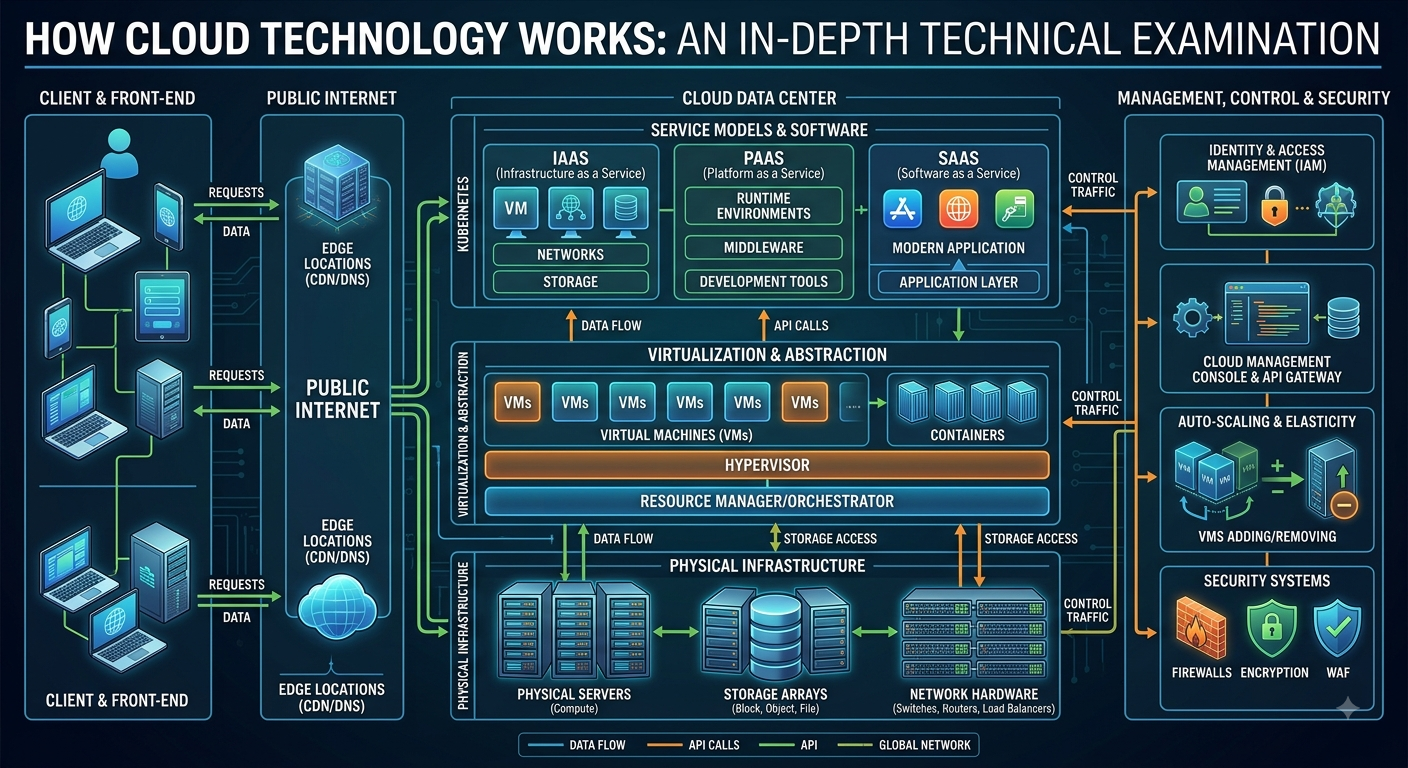
Cloud computing is one of the foundational technologies of modern digital infrastructure. It transforms computing from a collection of individually managed physical machines into a programmable, network-accessible pool of computing, storage, networking, and software resources. Users can request resources when needed, scale them according to workload, and access services without necessarily owning or operating the underlying hardware.
This thesis examines cloud technology from the physical data center upward: electrical power, servers, processors, memory, storage, networking, virtualization, containers, orchestration, databases, application platforms, security, monitoring, automation, artificial intelligence, distributed computing, resilience, economics, and future architectures. It also explains what actually happens when a user opens a cloud application, sends data across the Internet, requests computation, and receives a result.
1. Introduction
The word cloud can create the impression that computing somehow occurs in an invisible location. Technically, however, cloud computing is highly physical.
Behind every cloud service are:
- Data centers
- Electrical systems
- Cooling systems
- Servers
- CPUs and GPUs
- Memory
- SSDs and hard drives
- Network switches and routers
- Optical and electrical communication systems
- Operating systems
- Hypervisors
- Containers
- Databases
- Distributed software
- Security systems
- Monitoring platforms
- Automation systems
Cloud architecture combines these physical and virtual components into a system capable of delivering computing resources as services.
The fundamental transformation is therefore:
Physical hardware → abstraction → resource pooling → software control → network delivery → on-demand service
2. What Is Cloud Computing?
Cloud computing is the on-demand delivery of computing resources over a network. These resources can include processing, storage, databases, networking, applications, and development platforms.
Traditional computing generally follows this model:
User → Local computer → Local software → Local storage
Cloud computing introduces another architecture:
User device → Network → Cloud platform → Distributed computing infrastructure
The user’s device may therefore become primarily an interface to a much larger computing system.
For example, when someone uses an online document editor, the keyboard and screen are local, but much of the application’s storage, processing, synchronization, authentication, and collaboration infrastructure can reside in cloud systems.
3. The Physical Foundation of the Cloud
Cloud technology begins with physical infrastructure.
A simplified hierarchy is:
Electricity
↓
Data center
↓
Servers
↓
CPU / GPU / memory
↓
Virtualization
↓
Containers and operating systems
↓
Applications and services
↓
Internet/API
↓
User
Cloud computing therefore does not eliminate hardware. It changes how hardware is organized, abstracted, allocated, and consumed.
IEEE describes cloud infrastructure as a combination of physical and virtualized computing, storage, and networking resources managed through software-defined controls.
4. Data Centers
A cloud data center is the physical environment in which large-scale computing infrastructure operates.
A modern data center can contain:
- Server racks
- Power distribution equipment
- Backup power
- Cooling infrastructure
- Network equipment
- Storage systems
- Security systems
- Fire suppression
- Environmental monitoring
- Fiber-optic connections
- Management systems
The data center converts electrical energy into computational work.
At the most fundamental level:
Electrical energy → transistor switching → computation → data movement → useful digital service
This makes electricity one of the hidden foundations of cloud computing.
5. Servers: The Computing Engines
Servers are specialized computers designed to operate continuously and support large workloads.
A server generally contains:
- CPU
- RAM
- Storage interfaces
- Network interfaces
- Motherboard
- Power supplies
- Cooling
- Management controllers
The CPU executes instructions.
Memory stores actively used information.
Storage preserves information.
Network interfaces transmit and receive information.
These components operate together as a computing system.
6. CPUs and GPUs
6.1 CPUs
The central processing unit performs general-purpose computation.
A simplified processing cycle is:
Fetch → Decode → Execute → Store
Modern CPUs contain multiple cores and sophisticated mechanisms for parallel execution, caching, branch prediction, memory management, and instruction scheduling.
6.2 GPUs
Graphics processing units contain large numbers of computational units designed for highly parallel workloads.
This makes GPUs particularly important for:
- Artificial intelligence
- Machine learning
- Scientific computing
- Simulation
- Rendering
- Large matrix operations
The growth of AI has consequently transformed cloud infrastructure from predominantly CPU-oriented computing into increasingly heterogeneous systems containing CPUs, GPUs, AI accelerators, and specialized networking.
7. Memory Hierarchy
Cloud computing depends on multiple levels of memory.
A simplified hierarchy is:
CPU registers
↓
CPU cache
↓
RAM
↓
SSD
↓
Object storage / archival storage
As storage capacity generally increases, access latency tends to increase as well.
This creates a fundamental engineering problem:
How can enormous quantities of data be stored economically while still providing sufficient performance to applications?
Cloud providers solve this through multiple storage tiers and intelligent data-placement mechanisms.
8. Cloud Storage
Cloud storage is not a single technology.
The major categories are:
Block storage
Provides virtual disks or volumes to computing systems.
Typical uses include:
- Operating systems
- Databases
- Virtual machines
- High-performance applications
File storage
Provides hierarchical files and directories.
It is useful when multiple systems need shared file access.
Object storage
Stores data as objects with associated metadata.
It is particularly suitable for:
- Images
- Videos
- Backups
- Datasets
- Logs
- Software artifacts
- AI training data
At hyperscale, object storage has become particularly important because software can coordinate enormous distributed storage pools. Recent cloud-storage architecture discussions also emphasize object storage, metadata separation, and architectural fault tolerance for large AI workloads.
9. Networking: The Nervous System of the Cloud
Cloud computing depends on networking.
A simplified path is:
User device → Wi-Fi/mobile network → ISP → Internet → cloud edge → load balancer → application → database/storage
Within the cloud, networking becomes even more complex.
Data can move between:
- Servers
- Virtual machines
- Containers
- Databases
- Storage systems
- Data centers
- Geographic regions
High-performance cloud infrastructure therefore requires switches, routers, network interfaces, optical systems, software-defined networking, routing protocols, and traffic-management systems.
10. Virtualization
Virtualization is one of the fundamental technologies that enabled modern cloud computing.
Instead of dedicating one physical server to one operating system, virtualization allows physical resources to be divided into multiple virtual environments.
A simplified architecture is:
Physical hardware
↓
Hypervisor
↓
Virtual machines
↓
Guest operating systems
↓
Applications
The hypervisor controls access to physical resources.
It can allocate:
- CPU capacity
- Memory
- Storage
- Network interfaces
This creates resource isolation and improves hardware utilization.
11. Virtual Machines
A virtual machine behaves like a computer even though its resources are provided through software abstraction.
For example, a physical server might contain:
64 CPU cores + 512 GB RAM
The cloud management system can divide those resources among many virtual machines.
Each VM can have its own:
- Operating system
- Virtual CPU
- Virtual memory
- Virtual disk
- Network interface
The result is a programmable computing environment rather than a fixed physical machine.
12. Containers
Containers provide another abstraction layer.
Unlike traditional VMs, containers typically share the host operating-system kernel while maintaining isolated application environments.
A simplified architecture is:
Hardware
↓
Operating system kernel
↓
Container runtime
↓
Containers
↓
Applications
Containers package applications together with their dependencies, making deployment more portable and repeatable.
13. Virtual Machines vs Containers
| Characteristic | Virtual Machine | Container |
|---|---|---|
| Abstraction | Hardware/system | Operating-system level |
| Guest OS | Usually included | Usually shares host kernel |
| Startup | Generally slower | Generally faster |
| Isolation | Strong system-level isolation | Process/application isolation |
| Resource overhead | Higher | Lower |
| Typical use | Full operating environments | Microservices and applications |
Modern cloud architectures frequently use both.
Research into cloud architecture evolution identifies virtualization and containerization as important stages in the development of modern cloud platforms.
14. Cloud Orchestration
When an organization operates thousands or millions of containers, manually managing them becomes impossible.
Orchestration systems automate:
- Deployment
- Scheduling
- Scaling
- Service discovery
- Health monitoring
- Replacement of failed workloads
- Network configuration
- Rolling updates
A container orchestration platform therefore functions as a distributed management layer.
Conceptually:
Application requirements → Scheduler → Available infrastructure → Workload placement
15. Cloud Management Plane
One of the most important distinctions in cloud architecture is between the control plane and the data plane.
Control plane
Determines:
- What resources exist
- Where workloads run
- Who can access them
- How resources are configured
- How infrastructure scales
Data plane
Actually carries out workload operations.
For example:
Control plane: “Create a virtual machine with four CPUs.”
Data plane: Actually runs the VM and processes its workload.
This separation allows infrastructure to be managed programmatically.
16. APIs: The Programming Interface to Infrastructure
Cloud infrastructure is increasingly programmable.
Instead of manually installing a server, software can send an API request such as:
Create compute resource
The cloud platform then performs the required operations.
This produces a major transformation:
Hardware becomes programmable infrastructure.
Cloud APIs can control:
- Compute
- Storage
- Databases
- Networks
- Identity
- Security
- Monitoring
- Machine learning
- Application deployment
17. Infrastructure as Code
Infrastructure as Code extends this principle.
Instead of describing infrastructure through manual procedures, engineers define infrastructure through machine-readable configuration.
The system can then create the required environment automatically.
This improves:
- Repeatability
- Version control
- Automation
- Disaster recovery
- Infrastructure consistency
Infrastructure becomes increasingly similar to software: it can be defined, tested, versioned, deployed, and modified programmatically.
18. Service Models
Cloud services are commonly described through three major models.
18.1 Infrastructure as a Service — IaaS
The provider supplies infrastructure such as:
- Virtual machines
- Storage
- Networking
The customer controls more of the software environment.
18.2 Platform as a Service — PaaS
The provider supplies infrastructure plus development and application runtime capabilities.
The developer concentrates more heavily on application logic.
18.3 Software as a Service — SaaS
The provider operates the complete application.
The user primarily interacts with the finished software.
Google describes these three models as major cloud service categories.
19. Serverless Computing
Serverless computing pushes abstraction further.
The developer provides application code while the platform handles much of the underlying infrastructure management.
The conceptual architecture becomes:
Code → Cloud platform → Automatic resource allocation → Execution → Result
“Serverless” does not mean servers disappear. Servers still exist physically; the distinction is that the user does not directly manage them.
20. Databases in the Cloud
Cloud applications require persistent data systems.
Major database categories include:
Relational databases
Use structured tables and relationships.
NoSQL databases
Can provide flexible data models suitable for particular large-scale workloads.
Key-value databases
Organize data around keys and values.
Document databases
Store structured documents.
Graph databases
Represent entities and relationships.
Data warehouses
Optimize large-scale analytical queries.
Data lakes
Store very large quantities of raw and processed data.
Modern cloud architectures frequently combine several database technologies rather than relying on one universal database.
21. Distributed Computing
Cloud computing is fundamentally distributed computing.
Instead of one computer performing all work:
Workload → many machines → parallel processing → aggregation → result
This enables enormous scale.
If one machine can perform 1 unit of work per second, then 1,000 machines can theoretically provide approximately 1,000 units of parallel capacity for suitably parallel workloads, although real systems incur communication, coordination, and synchronization overhead.
22. Load Balancing
A cloud application may receive millions of requests.
Sending every request to one server would create a bottleneck.
A load balancer distributes traffic among multiple servers.
Conceptually:
Users
↓
Load balancer
↙ ↓ ↘
Server A — Server B — Server C
If one server becomes unavailable, traffic can be redirected to healthy servers.
This contributes to both performance and availability.
23. Auto-Scaling
Cloud platforms can automatically adjust resources according to demand.
For example:
Low demand → 5 servers
High demand → 100 servers
Demand falls → 20 servers
This is one of the defining characteristics of cloud computing: resources can be dynamically allocated rather than permanently fixed.
24. Availability and Fault Tolerance
Cloud infrastructure assumes that components will fail.
Servers can fail.
Disks can fail.
Network connections can fail.
Power systems can fail.
Software can fail.
Therefore, reliability is achieved primarily through architecture rather than assuming that individual components are perfect.
Techniques include:
- Replication
- Redundancy
- Failover
- Distributed storage
- Health checks
- Multiple availability zones
- Geographic redundancy
- Automated recovery
The fundamental principle is:
Expect failure → isolate failure → detect failure → recover automatically
25. Cloud Security
Security operates across multiple layers.
Physical security
Protects data centers and hardware.
Network security
Protects communication pathways.
Identity security
Controls who can access resources.
Application security
Protects software from vulnerabilities.
Data security
Protects information through mechanisms such as encryption and access controls.
Monitoring
Detects suspicious or abnormal activity.
Cloud security is therefore not a single product. It is an architecture.
26. Identity and Access Management
Identity and Access Management, commonly called IAM, determines:
Who can do what to which resource?
A secure system may distinguish between:
- User identity
- Device identity
- Application identity
- Service identity
- Administrator identity
Permissions can then be assigned according to roles and policies.
The principle of least privilege is particularly important:
Give each identity only the access required to perform its legitimate task.
27. Encryption
Encryption transforms readable information into protected information.
Two broad categories are:
Encryption in transit
Protects data while it moves across networks.
Encryption at rest
Protects stored information.
Cloud security systems may also use key-management systems to control cryptographic keys.
28. Observability
A cloud system cannot be effectively managed if engineers cannot see what it is doing.
Observability commonly involves:
- Metrics
- Logs
- Traces
- Events
- Alerts
For example:
Metric: CPU utilization = 85%
Log: Application error occurred
Trace: Request moved through five services before failing
Together, these provide visibility into distributed systems.
29. Data Replication
Replication creates multiple copies or representations of information.
For example:
Primary data → Replica A + Replica B + Replica C
If one storage system fails, another may continue serving the information.
Replication can improve:
- Availability
- Disaster recovery
- Read performance
- Geographic accessibility
However, replication also introduces complexity, especially around consistency and synchronization.
30. Consistency and Distributed Systems
Distributed systems must answer an important question:
What happens when multiple machines contain or modify the same data?
Possible architectural choices involve trade-offs among:
- Consistency
- Availability
- Latency
- Partition tolerance
There is no universally perfect architecture. The correct design depends on the application’s requirements.
Financial systems, social networks, scientific platforms, gaming systems, and AI applications can have very different consistency requirements.
31. Edge Computing
Traditional cloud architecture can involve sending data to centralized data centers.
Edge computing moves some processing closer to the user or device.
The architecture becomes:
Device → Edge → Regional cloud → Central cloud
This can reduce latency and network traffic.
Edge computing is especially relevant to:
- Telecommunications
- Internet of Things
- Autonomous systems
- Industrial systems
- Real-time applications
- Content delivery
32. Content Delivery Networks
A Content Delivery Network, or CDN, distributes copies of content across geographically distributed locations.
Instead of every user retrieving content from one distant server:
User → Nearby edge location → Content
This reduces latency and can reduce the workload on origin systems.
33. Cloud and Artificial Intelligence
AI has become one of the most important cloud workloads.
A modern AI cloud architecture can contain:
Data sources
↓
Object storage
↓
Data processing
↓
GPU/AI accelerator cluster
↓
Model training
↓
Model storage
↓
Inference infrastructure
↓
Application/API
↓
User
Large AI systems require enormous amounts of:
- Compute
- Memory
- Storage
- Network bandwidth
- Electricity
- Cooling
- Data
This has made cloud infrastructure an increasingly important foundation for AI development.
34. AI Training in the Cloud
AI training can be viewed as an iterative computational process:
Dataset → Model → Computation → Error calculation → Parameter updates → Repeat
Large training systems distribute these calculations across many accelerators.
The cloud provides the infrastructure necessary to provision and coordinate these resources.
35. AI Inference
Training creates a model.
Inference uses that trained model to produce results.
A simplified architecture is:
User request → API → Model server → AI accelerator → Model computation → Response
Cloud platforms can dynamically scale inference infrastructure according to demand.
36. Cloud Economics
Cloud computing changes the economics of IT.
Traditional infrastructure often requires:
Capital expenditure → hardware purchase → installation → maintenance → depreciation
Cloud infrastructure can shift more expenditure toward:
Usage → operational expenditure → dynamically allocated resources
The economic advantage depends on workload characteristics.
Cloud computing can be highly efficient for workloads requiring elasticity, but continuously running workloads can sometimes make dedicated infrastructure economically attractive.
Therefore, cloud architecture is not simply about minimizing cost. It is about optimizing:
Cost + performance + reliability + flexibility + security
37. Multi-Cloud Architecture
Organizations may use multiple cloud providers.
Possible motivations include:
- Redundancy
- Geographic requirements
- Avoiding excessive dependency on one provider
- Specialized services
- Regulatory requirements
- Business continuity
However, multi-cloud also creates additional complexity in:
- Networking
- Identity
- Monitoring
- Security
- Data movement
- Application portability
Research on software-defined multi-cloud systems highlights the importance of programmable networking, distributed resource management, and automated provisioning.
38. Hybrid Cloud
Hybrid cloud combines cloud infrastructure with other environments, such as private data centers.
A simplified architecture is:
Private infrastructure ↔ secure connection ↔ public cloud
Organizations may retain particular workloads locally while using public cloud infrastructure for other workloads.
39. The Cloud Request Lifecycle
Consider what happens when a user opens a cloud application.
Step 1 — User interaction
The user clicks a button.
Step 2 — Local processing
The device prepares a network request.
Step 3 — Network transmission
The request travels through local and Internet infrastructure.
Step 4 — Cloud entry
The request reaches a cloud endpoint.
Step 5 — Security validation
Identity and authorization mechanisms determine whether the request is permitted.
Step 6 — Load balancing
The request is routed toward an appropriate application instance.
Step 7 — Application processing
Application software executes the requested operation.
Step 8 — Database interaction
The application may retrieve or modify data.
Step 9 — Compute
CPU, GPU, memory, and other resources perform the required calculations.
Step 10 — Response
The result travels back through the network.
Step 11 — User interface
The device presents the result to the user.
Thus:
Human action → electrical signals → network packets → cloud software → computation → data → network packets → human-readable result
40. The Cloud as a Layered System
The entire technology can be represented as a layered architecture:
Layer 1 — Energy
Electricity and power infrastructure
Layer 2 — Physical infrastructure
Data centers, servers, storage, networking
Layer 3 — Semiconductor computing
CPUs, GPUs, memory controllers, network processors
Layer 4 — Virtualization
Hypervisors and virtual resources
Layer 5 — Operating systems
Linux, Windows and other operating environments
Layer 6 — Containers
Application isolation and packaging
Layer 7 — Orchestration
Automated deployment and scheduling
Layer 8 — Platform services
Databases, messaging, analytics and development tools
Layer 9 — Applications
Web applications, enterprise systems, AI services
Layer 10 — User interface
Browsers, mobile applications and other clients
This layered model explains how highly complex cloud environments can remain manageable.
41. The Fundamental Cloud Abstraction
The deepest technological achievement of cloud computing is abstraction.
A user does not need to know:
- Which physical CPU executed the calculation
- Which SSD stored the file
- Which network switch transmitted the packet
- Which physical server hosted the application
- Which rack contains the machine
- Which data center processed the request
Instead, the user interacts with a logical resource.
For example:
“Store this file.”
The cloud determines how and where that file should physically exist.
This is the central transformation:
Physical complexity → software abstraction → simple user interface
42. Cloud Automation
At hyperscale, manual infrastructure management becomes impossible.
Automation controls:
- Resource provisioning
- Scaling
- Configuration
- Monitoring
- Software deployment
- Failure recovery
- Security policies
- Data movement
This produces an infrastructure model in which software manages infrastructure.
The cloud consequently becomes increasingly autonomous.
43. Software-Defined Infrastructure
Traditional infrastructure is heavily tied to physical devices.
Cloud architecture increasingly separates:
What the infrastructure should do
from
Which physical device performs it
Software-defined systems can control networking, storage, security, and computing resources through centralized or distributed software.
This increases flexibility and allows infrastructure to be managed as a programmable system.
44. The Relationship Between Cloud, Internet and Data Centers
These technologies should not be confused.
Internet
The global communication network.
Data center
The physical facility containing computing infrastructure.
Cloud computing
The service architecture that abstracts computing resources and delivers them through networks.
Therefore:
Internet ≠ Cloud
The Internet is a communication infrastructure.
The cloud uses networks—including the Internet—to deliver programmable computing services.
45. Major Engineering Challenges
Cloud computing introduces major technical challenges.
Scalability
How can infrastructure support millions or billions of users?
Latency
How quickly can a request travel and be processed?
Reliability
How can services remain available despite failures?
Security
How can data and resources remain protected?
Cost
How can massive infrastructure remain economically sustainable?
Energy
How can growing computational demand be powered efficiently?
Data movement
How can enormous datasets move between storage and compute efficiently?
Complexity
How can billions of infrastructure components be managed?
These challenges define much of modern cloud engineering.
46. Energy and Sustainability
Cloud infrastructure consumes significant electricity because computing requires physical energy.
Energy is required for:
- CPUs
- GPUs
- Memory
- Storage
- Networking
- Cooling
- Power conversion
- Facility operations
Therefore, future cloud engineering must optimize not only computational performance but also:
Performance per watt
This is particularly important as AI workloads increase the computational density of data centers.
47. Future Cloud Architecture
The next generation of cloud computing is likely to combine:
- AI-native infrastructure
- Specialized accelerators
- Advanced networking
- Edge computing
- Distributed storage
- Serverless systems
- Autonomous infrastructure management
- Confidential computing
- Greater automation
- Hybrid and multi-cloud systems
- Energy-aware scheduling
The cloud is therefore evolving from a system that merely provides remote servers into an intelligent, programmable global computing fabric.
48. Cloud Computing as a Global Computer
A useful conceptual model is to imagine the global cloud as a gigantic distributed computer.
Instead of:
One CPU + one memory + one storage device
the cloud contains:
Millions of CPUs + GPUs + memory systems + storage systems + network systems
Software coordinates these resources.
The user sees only an interface.
This creates an extraordinary abstraction:
A person can request computational work without knowing which physical machine performs it.
That is one of the defining achievements of modern computing.
49. Complete Cloud Technology Stack
The complete stack can therefore be summarized as:
Energy
↓
Data centers
↓
Servers and semiconductor devices
↓
CPU / GPU / memory / storage
↓
Networking
↓
Virtualization
↓
Operating systems
↓
Containers
↓
Orchestration
↓
Databases and platform services
↓
Applications
↓
APIs
↓
Internet / private networks
↓
Web browsers and mobile applications
↓
Human users
Each layer depends on the layers beneath it.
50. Conclusion
Cloud technology is not a single product or machine. It is an integrated architecture combining physical computing infrastructure, networking, virtualization, distributed software, storage, databases, security, automation, and application services.
Its fundamental principle is simple:
Pool computing resources → abstract physical complexity → control resources through software → deliver them through networks → scale dynamically according to demand.
Virtualization allows physical resources to become virtual resources. Containers provide lightweight application isolation. Orchestration coordinates large numbers of workloads. Distributed storage makes enormous datasets accessible and resilient. Networking connects users and services. APIs make infrastructure programmable. Automation allows the entire system to operate at enormous scale.
The result is a new model of computing in which infrastructure becomes increasingly invisible to the end user while becoming increasingly sophisticated underneath.
The cloud is therefore best understood not as a distant storage location, but as a globally distributed computational architecture—a combination of electricity, semiconductor technology, data centers, networks, operating systems, virtualization, distributed algorithms, storage, security, and software engineering working together as one technological ecosystem.

Be First to Comment