
A technological research thesis | Computer engineering, digital infrastructure, data architecture and modern artificial intelligence
1. Introduction: Understanding Excess RAM
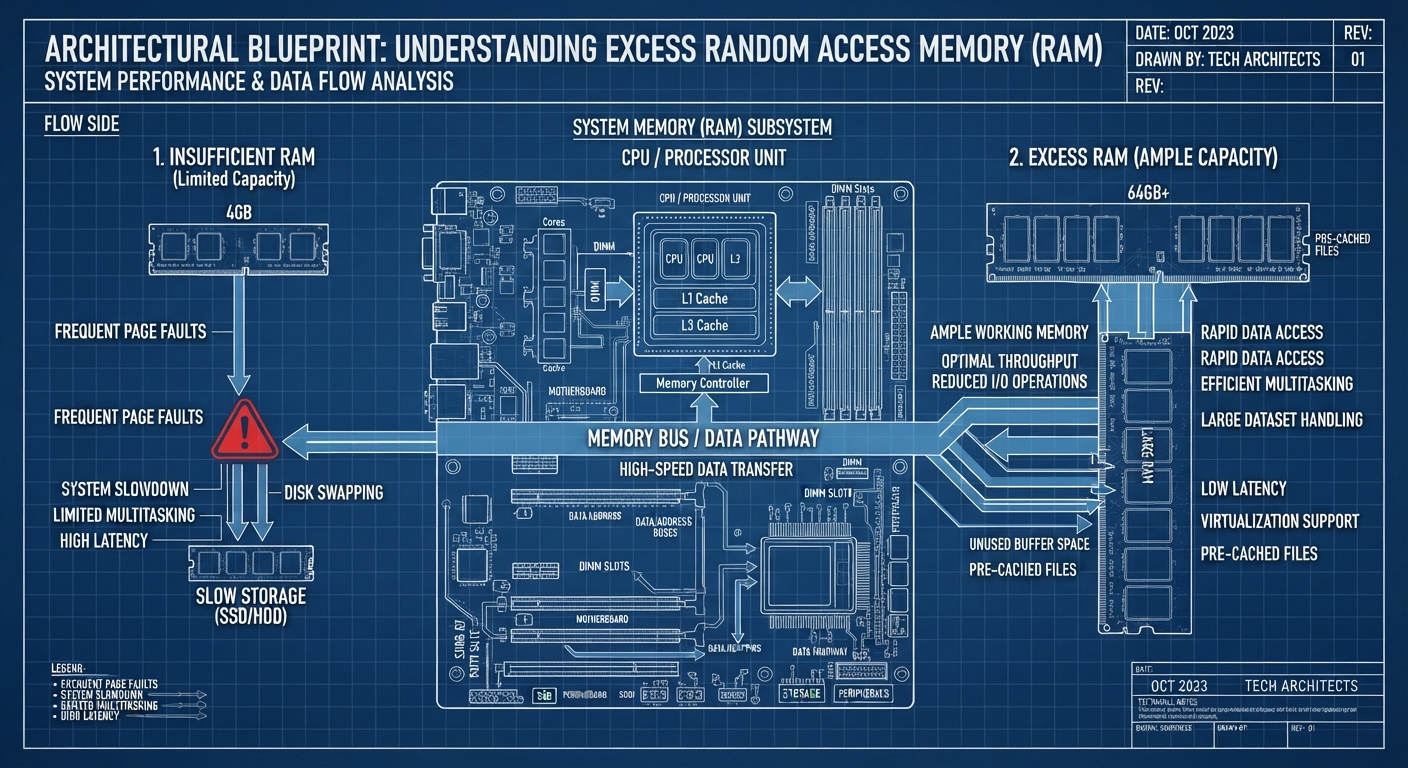
The expression excess random memory can refer to two related but different concepts in computer technology:
- Excess Random Access Memory (RAM): Having more physical memory capacity than a computer’s current workload requires.
- Excessive memory consumption: A computer system, application or operating system using more memory than necessary.
Understanding the difference is important because additional RAM can improve computing performance, while excessive memory consumption can reduce performance and waste computing resources.
RAM is one of the most important components of modern computing infrastructure. It provides temporary, high-speed storage for information that a computer’s processor needs to access while executing instructions.
Without sufficient RAM, even a powerful processor can experience performance limitations.
However, adding more RAM does not automatically make a computer faster. Its value depends on workload, memory architecture, processor capabilities, software design and data requirements.
2. Historical evolution of computer memory
Early Popular Computers, 1950 – 1970 – Engineering and Technology History Wiki
AXISWORKS Corsair Vengeance 128GB DDR5, 5200MHz, CL40-40-40-77, Desktop Memory RAM (4x32GB) – Shop
11
Computer memory has evolved through several technological generations.
| Period | Memory development | Significance |
|---|---|---|
| 1940s–1950s | Vacuum tubes and delay-line memory | Early electronic computing |
| 1950s–1960s | Magnetic-core memory | More reliable storage of working data |
| 1960s–1970s | Semiconductor memory | Miniaturisation |
| 1970s–1980s | DRAM and SRAM | Modern memory foundations |
| 1990s | SDRAM | Synchronised memory operations |
| 2000s | DDR generations | Higher bandwidth |
| 2010s | DDR4 and HBM | Advanced computing and graphics |
| 2020s | DDR5, LPDDR5X and HBM3/3E | AI, cloud and high-performance computing |
The historical transformation demonstrates how computer memory developed from relatively large electronic systems into highly integrated semiconductor technologies.
3. The fundamental architecture of RAM
Memory Hierarchy in Computer Architecture, Levels and Balancing Speed
RAM operates as part of a larger computer memory hierarchy.
The hierarchy determines how information moves between the processor, temporary memory and permanent storage.
3.1 Five major layers of computer memory
1. CPU Registers
Extremely fast storage inside the processor
2. CPU Cache (L1, L2, L3)
Keeps frequently needed instructions and data close to the CPU
3. Main RAM (DRAM)
Holds active programs and working data
4. SSD / HDD Storage
Stores operating systems, applications and files persistently
5. External / Network Storage
Provides remote and distributed information storage
Conceptual hierarchy: moving down generally increases capacity and access latency.
The most important principle is that different memory technologies perform different jobs.
- Registers support immediate processor calculations.
- Cache reduces the distance between the processor and frequently accessed information.
- RAM provides working space for active applications.
- SSDs preserve information when the computer is switched off.
- Network storage makes information accessible across connected systems.
RAM is not the same as a hard drive. RAM is generally volatile, meaning its contents are lost when power is removed.
4. The internal architecture of a RAM chip
Modern DRAM (Dynamic Random Access Memory) is constructed from enormous numbers of microscopic memory cells.
A conventional DRAM cell contains:
- A transistor that controls access to the cell.
- A capacitor that stores an electrical charge representing information.
- Word lines that select rows of memory cells.
- Bit lines that transfer information.
- Sense amplifiers that detect and restore stored information.
How does a RAM cell work?
A simplified process:
- The processor requests information.
- The memory controller identifies the required memory address.
- The relevant memory row is activated.
- Sense amplifiers detect the stored information.
- Data is transferred through the memory interface.
- The processor receives the information.
DRAM requires periodic refreshing because capacitor charge gradually leaks away.
This is why DRAM is called dynamic memory.
Two important memory technologies
About | Micron Technology Inc.
DRAM
- High capacity
- Lower cost per bit
- Requires refreshing
- Used for main system RAM
Ken Shirriff’s blog: December 2023
SRAM
- Very fast
- More expensive per bit
- Does not require DRAM-style refreshing
- Used for processor caches
5. Understanding the significance of excess RAM
Excess RAM is not necessarily a technological problem. It can be a valuable resource when future computing demands are expected to increase.
Consider a computer with 64 GB of RAM running an application that needs only 12 GB.
The remaining capacity provides additional headroom.
However, unused RAM does not automatically improve performance.
Five major benefits of having additional RAM
1. Multitasking
A computer can keep more applications and their working data in memory simultaneously.
2. Reduced reliance on virtual memory
When physical RAM is insufficient, an operating system may move memory pages to storage. This is called paging or swapping.
SSD storage is generally much slower than physical RAM, so excessive paging can reduce responsiveness.
3. Larger datasets
Scientists, engineers, financial analysts and researchers can work with larger datasets without constantly retrieving information from storage.
4. Virtualisation
A server can allocate memory to multiple virtual machines, provided its physical resources and operating system support the workload.
5. Artificial intelligence
AI systems can benefit from additional memory when loading large datasets, models and intermediate calculations.
However, GPU memory, system RAM and high-bandwidth memory are different resources. More system RAM cannot automatically compensate for insufficient GPU memory.
6. The disadvantages of excessive memory allocation
New Platform Lets GPUs and FPGAs Use Intel Optane Memory Modules | Tom’s Hardware
Excessive memory is not always beneficial.
There are several important engineering considerations.
| Problem | Explanation |
|---|---|
| Financial waste | Paying for capacity that is rarely used |
| Higher power consumption | Additional memory modules consume electricity |
| Heat generation | More components can increase thermal requirements |
| Memory pressure | Applications may consume available memory inefficiently |
| Software limitations | Some applications cannot benefit from additional RAM |
| Hardware compatibility | Motherboards and processors have memory limits |
| Reliability considerations | More modules can complicate memory configurations |
Another important issue is memory leaks.
A memory leak occurs when an application continues to retain memory that it no longer needs. Over time, this can reduce the amount of memory available to other applications.
Adding RAM might delay the symptoms, but it does not correct the underlying software problem.
7. Understanding RAM capacity mathematically
RAM capacity is measured in bytes.
The common units are:
| Unit | Approximate binary capacity |
|---|---|
| 1 KiB | 1,024 bytes |
| 1 MiB | 1,024 KiB |
| 1 GiB | 1,024 MiB |
| 1 TiB | 1,024 GiB |
Manufacturers frequently use GB and TB, based on decimal measurements, so advertised capacity and operating-system measurements may differ slightly.
Example: Memory allocation
Imagine a computer with 64 GB of physical RAM.
Its workload uses:
- Operating system: 6 GB
- Browser: 4 GB
- Research software: 8 GB
- Database: 12 GB
- Other applications: 4 GB
Total estimated memory use:
\[ 6+4+8+12+4=34\text{ GB} \]
Remaining physical capacity:
\[ 64-34=30\text{ GB} \]
Illustrative 64 GB RAM allocation
34 GB in use
30 GB remaining
53.1%
Estimated physical memory utilisation
This calculation is illustrative. Actual operating-system memory reporting also includes caches, shared memory, reserved memory and other categories.
8. The relationship between RAM, CPU and storage
Tin học lớp mầm: CPU là gì, CPU hoạt động ra sao
A computer’s performance depends on the cooperation of several components.
The four major components
CPU – Central Processing Unit
Executes instructions and performs calculations.
RAM – Random Access Memory
Provides temporary working space for instructions and data.
Storage – SSD or HDD
Preserves programs, documents, databases and operating-system files.
Memory controller
Coordinates communication between the processor and system memory.
The complete performance relationship can be represented as:
\[ P=f(C,M,B,L,S,W) \]
Where:
- \(P\) = overall computing performance
- \(C\) = processor capability
- \(M\) = memory capacity
- \(B\) = memory bandwidth
- \(L\) = memory latency
- \(S\) = storage performance
- \(W\) = workload characteristics
This illustrates an important engineering principle: increasing one resource cannot necessarily overcome limitations in another.
For example, a computer with abundant RAM but a weak processor may still perform poorly when executing demanding calculations.
9. RAM bandwidth and latency: Two critical measurements
Capacity is only one dimension of memory performance.
9.1 Memory bandwidth
Bandwidth measures how much data can be transferred in a given amount of time.
It is commonly measured in GB/s.
For example, a memory interface with a theoretical bandwidth of 50 GB/s can transfer a maximum theoretical 50 gigabytes per second under the stated conditions.
Actual performance depends on memory configuration and workload.
9.2 Memory latency
Latency measures the delay between requesting information and receiving it.
It is commonly expressed in nanoseconds or memory clock cycles.
Lower latency is generally desirable.
| Measurement | What it tells us |
|---|---|
| Capacity | How much information can be held |
| Bandwidth | How quickly data can move |
| Latency | How long access takes |
| Frequency / data rate | How rapidly memory transfers data |
| Reliability | How consistently information is maintained |
A system with a large RAM capacity is not necessarily faster than a system with a smaller but faster and better-configured memory system.
10. Different generations and architectures of RAM
LPDDR5X | Micron Technology Inc.
高带宽内存的下一步是什么 – Embedded AI Data Center
7
Modern computing uses several types of RAM.
| Technology | Main application | Significance |
|---|---|---|
| DDR3 | Older computers | Earlier generation |
| DDR4 | Desktop and server computers | Higher efficiency and performance than DDR3 |
| DDR5 | Modern computers and servers | Higher data rates and improved architecture |
| LPDDR5X | Smartphones and laptops | Low-power memory |
| GDDR6/GDDR7 | Graphics processors | High graphics memory bandwidth |
| HBM | AI accelerators and HPC | Very high bandwidth using stacked memory |
Why HBM is particularly important
High Bandwidth Memory is an important technology in modern artificial intelligence infrastructure.
It uses vertically stacked memory dies and advanced packaging to provide high-bandwidth communication with processors and accelerators.
Its significance includes:
- Supporting large AI computations.
- Moving large quantities of data.
- Reducing certain data-transfer bottlenecks.
- Supporting scientific simulations.
- Improving the memory capabilities of high-performance computing systems.
However, HBM is not simply excess conventional RAM. It is a specialised memory architecture designed for particular computing requirements.
11. Excess RAM in artificial intelligence and machine learning
AI Cluster Solutions for Scalable Compute | Hypertec
Artificial intelligence is increasing the importance of memory architecture.
AI applications frequently process enormous amounts of information.
Consider an AI model that needs to:
- Load model parameters.
- Process training datasets.
- Perform mathematical operations.
- Store intermediate results.
- Generate predictions.
- Transfer information between processors and memory.
All these activities require memory resources.
Three important memory environments
RAM Biwin RU200 16GB DDR5 4800MHz UDIMM | Chính Hãng
System RAM
Supports operating systems, application execution, data preparation and CPU workloads.
Обзор видеокарты Palit GeForce RTX 4080 Super GamingPro OC (16 ГБ)
GPU memory (VRAM)
Holds graphics data, model parameters and computational data used by GPUs.
[반도체 장비 트렌드 2편] 반도체 장비 핵심 기술 트렌드 | EUV·HBM·GAA·후공정 패키징 완전 해설 – AI 트렌드 NEWS 1페이지 – 커뮤니티 :: 이젠온라인에듀
High Bandwidth Memory
Provides high-bandwidth data access for advanced AI accelerators and scientific computing.
Example: AI model memory requirements
Suppose an AI model contains 7 billion parameters.
If each parameter is represented using 16 bits, the theoretical parameter storage requirement is:
\[ 7,000,000,000 \times 2 \]
\[ =14,000,000,000\text{ bytes} \]
Approximately 14 GB in decimal units.
This is only the parameter storage requirement. Actual AI memory needs can be considerably larger because of:
- Intermediate activations.
- Temporary computation buffers.
- Attention mechanisms and key-value caches.
- Training gradients.
- Optimiser states.
- Framework overhead.
Training generally requires more memory than simply storing the model parameters.
This is why AI infrastructure requires careful memory planning rather than simply purchasing the largest available RAM capacity.
12. RAM in cloud computing and data centres
Microsoft, Amazon, and Google operate half the world’s 600 hyperscale data centers – DCD
Modern data centres are among the largest users of computer memory infrastructure.
A data centre may operate thousands of physical servers, each with its own memory architecture.
Five important applications
- Cloud computing: Provides memory for virtual servers and cloud applications.
- Database management: Keeps frequently accessed information available.
- Financial services: Supports transaction processing and real-time analytics.
- Scientific research: Supports large-scale mathematical calculations.
- Artificial intelligence: Supports model inference, training and data processing.
Memory architecture in a cloud environment
Cloud computing infrastructure
Server A
CPU + RAM
Server B
CPU + RAM
Server C
CPU + RAM
Server D
CPU + RAM
Shared network and storage infrastructure
Connects services and persistent information resources
A critical distinction: ordinary server RAM is generally local to its server. It is not automatically combined into one giant pool merely because servers are connected to a network.
Distributed memory systems require specialised software and hardware architectures.
13. How to determine whether a computer has excess RAM
The correct approach is to monitor actual memory utilisation rather than relying on capacity alone.
Important measurements
| Measurement | What to investigate |
|---|---|
| Total installed RAM | Physical capacity |
| Used memory | Memory currently occupied |
| Available memory | Memory available for immediate use |
| Cached memory | Memory used to accelerate access |
| Committed memory | Virtual memory commitments |
| Swap/page-file activity | Pressure on physical memory |
| Application memory | Which programs consume the most |
Practical example using Windows
You can examine your computer’s memory usage:
- Press
Ctrl + Shift + Esc. - Open Task Manager.
- Select Performance.
- Select Memory.
- Examine installed capacity, memory in use, available memory and speed.
Then open the Processes section to identify applications consuming substantial memory.
Do not automatically interpret high RAM usage as a problem. Operating systems deliberately use otherwise available memory for caching.
14. The economics of excess RAM
Memory capacity has an economic value.
Businesses must balance the cost of purchasing and maintaining RAM against the performance benefits it provides.
The economic optimisation model
A simplified model is:
\[ C_{\text{total}} = C_{\text{hardware}}+ C_{\text{power}}+ C_{\text{maintenance}}+ C_{\text{performance loss}} \]
Where:
- Hardware cost represents memory purchases.
- Power cost represents electricity consumption.
- Maintenance represents operational expenditure.
- Performance loss represents the economic cost of inadequate memory.
The objective is not to maximise RAM capacity.
The objective is to achieve the best performance and reliability at an economically sustainable cost.
Example of business applications
| Industry | Why additional RAM matters |
|---|---|
| Banking | Transaction processing and databases |
| Healthcare | Medical information systems and research |
| Agriculture | Farm management and data analytics |
| Mining | Geological modelling and industrial systems |
| Education | Research platforms and virtual laboratories |
| Telecommunications | Network management and data processing |
| Manufacturing | Industrial automation and simulations |
For South African businesses, this is particularly relevant when evaluating the costs of cloud infrastructure, electricity, server procurement and digital transformation.
15. The future of memory technology: 2027–2040
Why NIST Is Putting Its CHIPS Into U.S. Manufacturing | NIST
[반도체 장비 트렌드 2편] 반도체 장비 핵심 기술 트렌드 | EUV·HBM·GAA·후공정 패키징 완전 해설 – AI 트렌드 NEWS 1페이지 – 커뮤니티 :: 이젠온라인에듀
11
The future of computer memory will involve more than increasing capacity.
Researchers and semiconductor manufacturers are investigating improvements in:
1. 3D memory architecture
Vertically stacking memory components to improve density and data-transfer capabilities.
2. Processing-in-memory
Bringing selected computing operations closer to where data is stored to reduce data movement.
3. Compute-in-memory
Exploring ways to perform certain calculations within memory structures themselves.
4. Advanced memory packaging
Connecting processors and memory more efficiently through advanced semiconductor packaging.
5. Persistent memory research
Developing technologies that combine certain characteristics of conventional memory and persistent storage.
6. Optical interconnects
Using optical communication technologies to improve data movement between computing components and systems.
These developments could help address a fundamental computing challenge: moving information between storage and processing units can consume substantial time and energy.
This is sometimes called the memory wall.
16. The memory wall: One of modern computing’s biggest challenges
The memory wall describes the growing difficulty of keeping processors supplied with information at the speed they can process it.
Processors have become extremely powerful, but moving information between memory and processors remains a major engineering challenge.
This creates three important research questions:
- How can memory bandwidth increase without excessive energy consumption?
- How can memory capacity increase without dramatically increasing manufacturing costs?
- How can processors and memory communicate more efficiently?
The future of computing will depend not only on faster processors but also on more intelligent memory architectures.
17. Complete RAM architecture blueprint
The following blueprint summarises the relationship between the major components of a modern computer.
Memory Systems- Cache Dram Disk Chapter 7~7.2_memory systems中文版-CSDN博客
Integrated memory architecture
APPLICATIONS
AI • Databases • Browsers • Research • Operating systems
PROCESSING SYSTEM
CPU • GPU • Processing instructions
MEMORY CONTROLLER AND INTERCONNECTS
SRAM / CACHE
Fast local memory
DRAM / RAM
Main working memory
GPU / HBM
High-bandwidth computing
SSD / STORAGE
Permanent information
DATA MANAGEMENT AND SYSTEM OPTIMISATION
Monitoring • Allocation • Security • Reliability • Performance
18. Research and innovation opportunities
The subject of excess RAM creates opportunities for further technological research.
| Research area | Innovation opportunity |
|---|---|
| Memory optimisation | Reduce unnecessary memory consumption |
| AI memory management | Improve model-loading efficiency |
| Cloud infrastructure | Improve server memory utilisation |
| Database architecture | Reduce unnecessary data retrieval |
| Energy efficiency | Reduce memory-system power requirements |
| Semiconductor engineering | Improve memory density |
| Cybersecurity | Protect sensitive information held in memory |
| Operating systems | Improve memory allocation and reclamation |
Suggested research questions
- How much additional RAM does modern AI infrastructure actually require?
- Can intelligent memory management reduce data-centre electricity consumption?
- What is the economic value of unused RAM capacity?
- How can memory architectures improve South Africa’s digital infrastructure?
- What are the limits of conventional DRAM technology?
19. Recommended foundational knowledge
To understand this subject at university engineering level, five disciplines are particularly important:
- Computer architecture.
- Digital electronics and semiconductor engineering.
- Operating systems and memory management.
- Data structures and programming.
- Artificial intelligence and high-performance computing.
Useful foundational references include:
- Computer Organization and Design — David A. Patterson and John L. Hennessy.
- Computer Architecture: A Quantitative Approach — John L. Hennessy and David A. Patterson.
- Operating System Concepts — Abraham Silberschatz, Peter B. Galvin and Greg Gagne.
- JEDEC semiconductor memory standards.
- IEEE computer architecture and memory research publications.
20. Final scientific conclusion
The significance of excess Random Access Memory extends far beyond the quantity of memory installed in a computer.
It concerns how efficiently an entire computing system stores, retrieves, transfers, processes and manages information.
The central engineering lesson is:
More memory provides greater capacity, but intelligent memory architecture determines how effectively that capacity is used.
As artificial intelligence, scientific research, financial systems, robotics, telecommunications and cloud computing continue to develop, memory engineering will remain one of the foundations of modern technological advancement.
Understanding RAM therefore means understanding one of the fundamental infrastructures upon which our digital civilisation operates.





Be First to Comment