
1. Vision & Purpose of the App
The Makoti Free-Range Eggs App should serve three main purposes:
- Education for youth and farmers
- Farm management tools
- Marketplace for eggs and poultry products
Core Mission
Build a smart poultry ecosystem that helps farmers:
- Learn poultry farming
- Monitor production
- Sell eggs directly
- Use AI for decision support
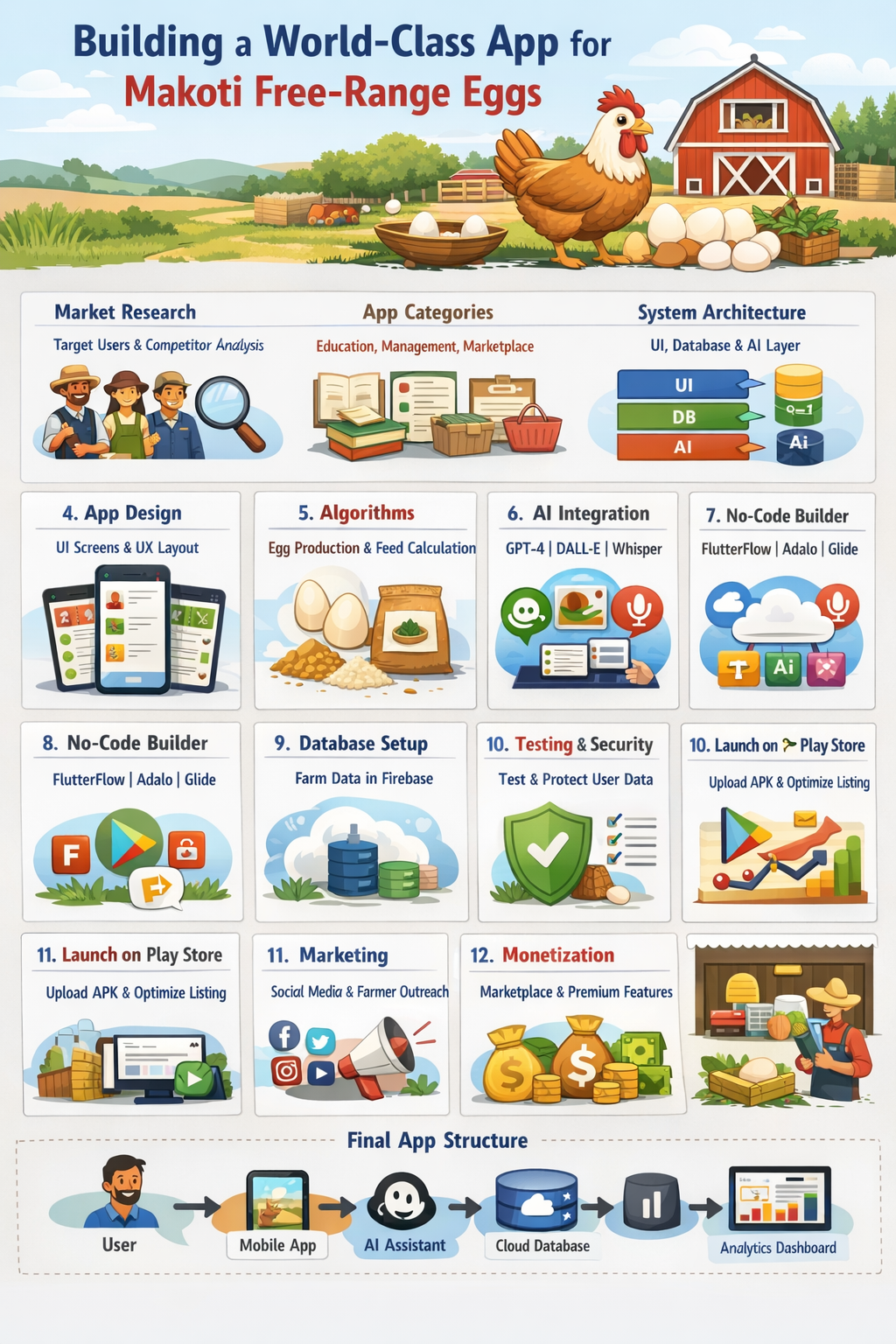
2. Stage 1 — Market Research
Before building the app, understand the users.
Target Users
- Small poultry farmers
- Youth learning agriculture
- Poultry farm owners
- Egg buyers
- Agricultural students
Research Questions
Ask at least 20–30 questions like:
- How many chickens do farmers manage?
- What problems do farmers face?
- How do they sell eggs?
- What diseases affect chickens?
- How do they track production?
Competitor Analysis
Study apps like:
- Poultry Manager 2.0
- Farmbrite
- AgriApp
Look at their features, weaknesses, and design.
3. Stage 2 — App Categories
Structure the app into major functional modules.
1. Farm Education
Courses and tutorials on:
- Free-range chicken farming
- Feeding systems
- Egg production
- Disease prevention
2. Farm Management
Track:
- Number of chickens
- Egg production
- Feed consumption
- Vaccination schedules
3. Egg Marketplace
Farmers can:
- List eggs
- Set prices
- Sell locally
4. AI Farm Advisor
An AI assistant answering questions like:
- “Why are my chickens not laying eggs?”
- “What is the best feed?”
5. Farm Analytics Dashboard
Show graphs for:
- Egg production trends
- Feed efficiency
- Profit analysis
4. Stage 3 — System Architecture
Design the structure of the app.
Layers of the App
1. User Interface (UI)
Screens the user sees.
2. Application Logic
Rules and algorithms.
3. Database
Stores data.
4. AI Layer
Smart recommendations.
5. Stage 4 — App Screens
Create the core screens.
Main Screens
- Welcome screen
- Login / Signup
- Dashboard
- Farm records
- Egg production
- Marketplace
- Learning hub
- AI assistant
- Settings
6. Stage 5 — Database Design
The app needs structured data.
Main Tables
Farmers Table
- Farmer ID
- Name
- Location
- Farm size
Chickens Table
- Breed
- Age
- Quantity
Egg Production Table
- Date
- Eggs collected
- Eggs sold
Feed Table
- Feed type
- Amount used
- Cost
7. Stage 6 — Algorithms
Algorithms help the app make decisions.
Egg Production Algorithm
Estimate expected eggs.
Formula:
Expected eggs =
Number of hens × laying rate
Example:
100 hens × 80% = 80 eggs/day
Feed Consumption Algorithm
Feed needed =
Chicken count × daily feed per chicken
Example:
100 chickens × 120g = 12 kg/day
Profit Algorithm
Profit =
Total sales − feed cost − medicine cost
8. Stage 7 — Artificial Intelligence Integration
Add AI features.
AI Capabilities
- Chicken disease detection
- Feed recommendation
- Egg production prediction
- Farming chatbot assistant
Best OpenAI Models for This App
Recommended models:
- OpenAI GPT‑4o
- Farm chatbot
- Farmer questions
- OpenAI GPT‑4.1
- Tutorials and knowledge
- OpenAI DALL·E
- Educational farm illustrations
- OpenAI Whisper
- Voice input for farmers
9. Stage 8 — No-Code App Builders
You can build the app without coding.
Best platforms:
1
FlutterFlow
Advantages:
- Drag-and-drop design
- Firebase integration
- Android export
2
Adalo
Advantages:
- Simple interface
- Fast development
3
Glide Apps
Advantages:
- Connects with Google Sheets
10. Stage 9 — UI/UX Design
Use professional design tools.
Best tools:
- Figma
- Adobe XD
Design principles:
- Simple navigation
- Large buttons for farmers
- Clear farm dashboards
- Offline capability
11. Stage 10 — Backend Infrastructure
The backend stores data.
Recommended backend:
Cloud Database
Use:
- Firebase
Features:
- Authentication
- Cloud database
- Push notifications
- Analytics
12. Stage 11 — Testing
Test the app before launch.
Types of testing:
- Functional testing
Check all features. - Usability testing
Ensure farmers understand it. - Performance testing
Check speed and reliability.
13. Stage 12 — Security
Protect user data.
Security methods:
- Login authentication
- Secure database rules
- Data encryption
14. Stage 13 — Monetization
Ways to make money.
- Egg marketplace commission
- Premium farm analytics
- Farm training courses
- Advertising agricultural products
15. Stage 14 — Prepare for Play Store
To publish, you need:
- App icon
- Screenshots
- Privacy policy
- App description
Publish through:
- Google Play Console
Steps:
- Create developer account
- Upload APK or AAB file
- Add screenshots
- Submit for review
16. Stage 15 — Launch & Marketing
After publishing:
Promote the app via:
- Social media
- Farmer associations
- Agricultural schools
- Local farm cooperatives
17. Long-Term Future Features
Add advanced capabilities:
- IoT chicken coop sensors
- Egg price forecasting
- AI disease detection with camera
- Smart feeding automation
18. Complete App Architecture (Simple)
User
↓
Mobile App
↓
Cloud Database
↓
AI Assistant
↓
Analytics Dashboard
Final Result
The Makoti Free-Range Eggs App becomes:
- A poultry academy
- A farm management system
- A digital egg marketplace
- An AI farming assistant


Be First to Comment